
What a Solano County Court Docket Shows
A docket is the chronological log of events in a court case. In Solano County, a docket entry can show a filing, a hearing setting, a minute order, a continuance, a plea, or a judgment. Each line ties to a single date and case number. The docket is not the full case file. It is a list pointing to events. Documents that go with those events sit inside the case file held by the clerk.
Public users see most docket data on either the court calendar or the Solano Superior Court portal. The court calendar acts as a forward-looking docket and shows hearings on a given day or in a date range. The portal shows the historical docket once a case is open and a user has logged in. Confidential matters, sealed filings, juvenile cases, and most mental health proceedings will not appear in either tool. That follows California Rule of Court 2.503, which limits remote access to certain case types.
Typical fields on a Solano docket entry include the hearing date and time, the case number, the party caption, the department code (for example, DPT 7), and the hearing type. Hearing types span a wide range, from OSC Hearing to Preliminary Examination, Motion Hearing, Trial Management Conference, Jury Trial, Diversion Hearing, and Placement Hearing. Most case numbers carry a prefix that tells the case type. CL is limited civil. CU is unlimited civil or a name change in some matters. F or FCR is criminal. FL is family law. FS is family support.
How to Find Solano County Court Dockets
The most direct path is the official court calendar search on the Solano Superior Court site. It is keyword-based and works without a court account. Use it to find any hearing in the near future when you know a name, a case number, or just a hearing type.
- Open the court calendar page at the Solano courts site.
- Type a name or case number into the keyword field. The placeholder reads "Search for name or case number."
- Pick a hearing type from the drop-down if you want to narrow results. Leave it blank to see all hearings.
- Click Search. Results list Hearing Date, Case Number, Party Name, Department, and Hearing Type.
- Note the department code on the entry you want. That tells you which courtroom to visit or which judicial assistant to call.
- For the full docket history of a case, copy the case number and open the Solano Superior Court public portal, log in, and run a Case Search.
People look up a Solano County court docket for many reasons. Lawyers track upcoming hearings on cases they handle. Defendants and family members check when to appear. Reporters watch high-profile criminal matters. Process servers verify hearing dates. The court calendar is free, the data is current, and it does not store a search history.
A useful tip: the court calendar will accept a partial name. So a search for a last name alone will pull all matching parties. Combine that with a hearing type filter to thin out the list. If a case is confidential or sealed under Rule 2.550, the docket entry will not show.
You can also reach the calendar through the court's main online services page, which lists case search, clerk appointments, court calendar, reporter transcripts, fee waiver/financial hardship requests, ADA support, local rules, and self-help links in one place.
The Solano Court Calendar Search
The court calendar lookup uses a small set of fields. None are required. The simplest search is a keyword plus a date. The fields below are what the public form exposes, along with the result columns the search returns.
| Field | Type | Required | Notes |
|---|---|---|---|
| Keyword | Text | No | Placeholder: "Search for name or case number." Accepts a party name or case number. |
| Hearing Type | Drop-down | No | Filters by event type, such as OSC Hearing, Preliminary Examination, Motion Hearing, Jury Trial. |
| Date Range | Date | No | Pick a single day or a range. Leave open to see the full forward calendar. |
| Department | Result column | n/a | Returned in results. Examples: DPT 5, DPT 7, DPT 9, DPT 11, DPT 23. |
| Case Type | Inferred from prefix | n/a | CL = limited civil. CU = unlimited civil. F/FCR = criminal. FL = family. FS = family support. |
| Search | Button | n/a | Runs the keyword and filter query. |
Results display in a table with hearing date and time, case number, party caption, department, and hearing type. The calendar does not show the assigned judge in the result row. To match a department to a judge, cross-check with the court's local rules or department setting guides. Documents are not downloadable from the calendar. For a copy of a minute order or a filing tied to a docket entry, use the portal or the clerk.
Here is the Solano court online services screen, which is the launch point for the calendar and the portal.
Source: Solano Superior Court online services page.
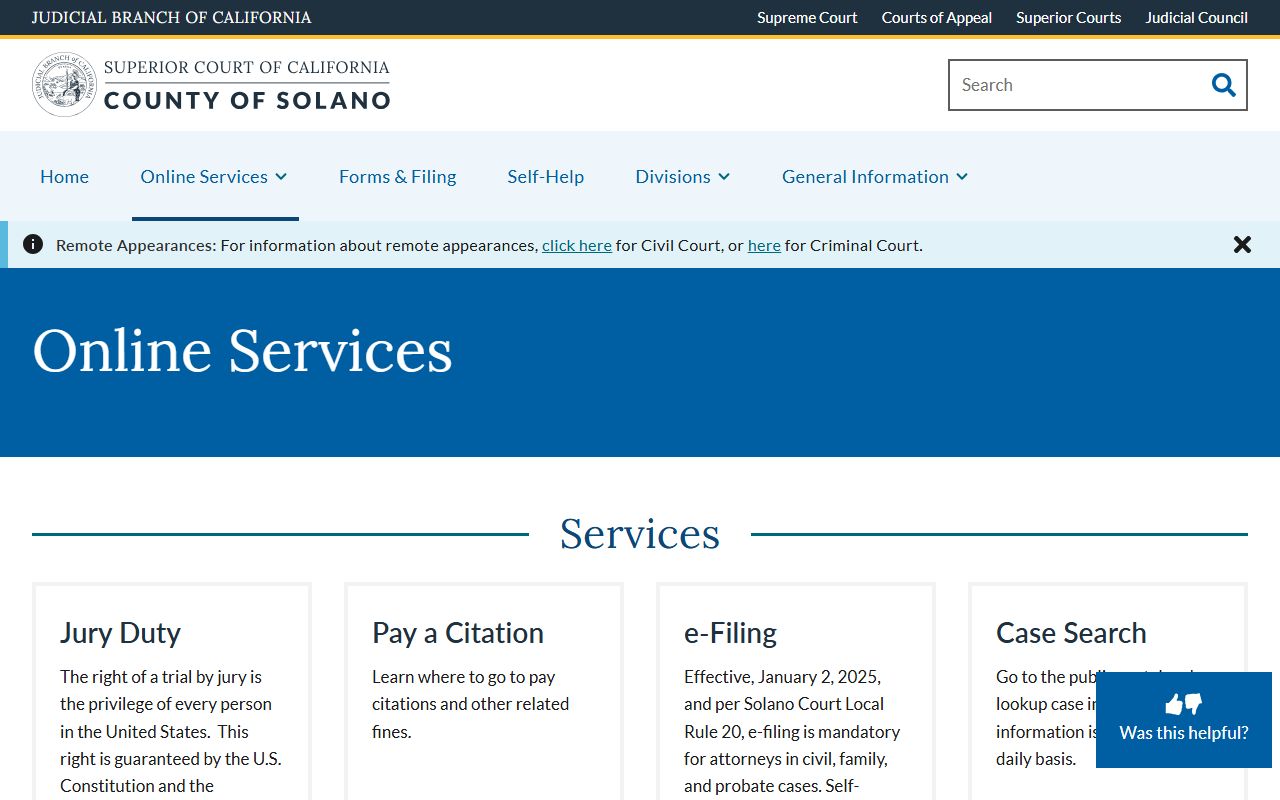
The page links every key public-facing tool the court runs, including the calendar lookup, reporter transcripts, financial hardship requests, and local rules.
The Solano Superior Court Public Portal
After a docket entry surfaces on the calendar, the next step is the Solano Superior Court public portal. The portal pulls full case data from the court's case management system. It supports searches by case number, last name, first name, and company name. A date-range filter narrows by filing date. To use the portal, a user has to register and agree to the terms of use.
Account fields are basic: email, password, name, and phone number. Two characters are the minimum for any name field. If a name search returns too many hits, add a first name or a filing date range. Confidential cases and confidential documents will not show up in the portal. That is by court rule, not a portal bug.
The portal also supports enhanced access for attorneys of record and certain parties under California Rules of Court 2.515 through 2.523. Enhanced access went live on February 26, 2024 and requires identity verification. Accepted ID forms include a driver's license, passport, military ID, state-issued ID, Permanent Resident ID, Non-Immigrant Visa, and State Bar ID Card. Attorneys can use the Attorney Case Access Request Form to ask for access to multiple cases in the same division at once.
One thing to keep in mind. Under California Rule of Court 2.504(b), electronic trial-court records are not the official record of the court unless electronically certified. For a certified copy of any docket entry, minute order, judgment, or filing, contact the clerk during normal business hours. The criminal records review window runs 8:00 AM to 3:00 PM on court days.
Here is the public portal home page, which is where account creation and case search start.
Source: Solano Superior Court public portal.
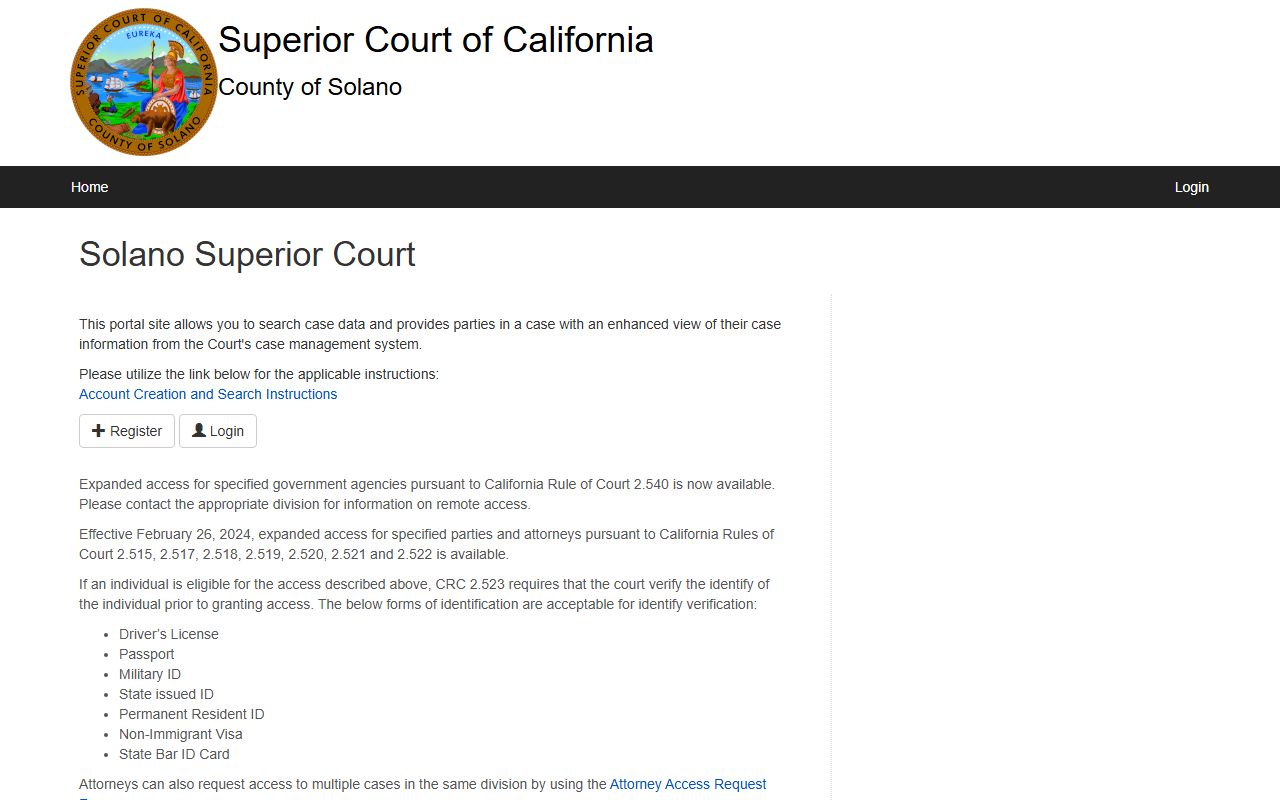
The portal home page lays out Register, Login, and Case Search in a clean menu.
Dockets vs Full Case Records
A docket entry and a full case file are two different things. The docket is a short summary line, the file is the documents behind it. Knowing which one you need saves time at the clerk's window.
| Docket Entry | Full Case File | |
|---|---|---|
| What it contains | Date, case number, party caption, department, hearing or filing type, short event note. | Pleadings, motions, exhibits, orders, judgments, minute orders, transcripts, attachments. |
| Where to find it | Solano court calendar and the portal Case Search results page. | Solano Superior Court portal (logged in) or the clerk's office at the proper branch. |
| Certified or informational | Informational only. Under Rule 2.504(b), not official unless electronically certified. | Certified copies come from the clerk and may require Local Form 4021 plus fees paid in advance. |
| Cost | Free to view. | Per-page and certification fees apply. Fee waivers exist for those who qualify. |
| Confidentiality | Confidential cases not listed at all. | Sealed filings under Rule 2.550 are removed from public view inside an otherwise public file. |
For a quick "when is court?" answer, the docket is enough. For a court order, a judgment, or evidence of service, the case file is the right call. The clerk's office at the Solano Superior Court handles certified copies.
Sample Solano County Docket Entry
A typical Solano docket line shows up like this on the public calendar. The fields below come straight from real entries on the official calendar tool, with the values shown as the kind of data you would see.
| Field | What It Shows |
|---|---|
| Case Number | Local format: CL24-05053 (limited civil), CU26-01692 (unlimited civil), F24-01630 (felony), FL25-02172 (family law). |
| Hearing Date | Date and time, formatted MM/DD/YYYY HH:MMam or pm, for example 05/18/2026 10:00am. |
| Department | Courtroom assignment shown as DPT plus a number. Common examples: DPT 5, DPT 7, DPT 11, DPT 23. |
| Hearing Type | Event label, such as OSC Hearing, Motion Hearing, Preliminary Examination, Trial Management Conference, Jury Trial, Diversion Hearing, or Placement Hearing. |
| Parties | Case caption. Examples: "LVNV Funding LLC vs. Jerald E Hawkins," "People vs. [defendant]," "In the Matter of [person]," or "County of Solano (DCSS) vs. [party]." |
| Result / Tentative Ruling | For probate matters, a pre-grant order posts the court day before the hearing after 2:00 PM. Civil and family law tentative rulings are issued through the department where applicable. |
Note that the calendar will not list a judge in the result row. The department number is the link between the docket entry and the bench officer. Cross-check the department with the court's setting guides, or call the judicial assistant on file for that department.
Solano Departments and Their Calendars
Solano runs a unified Superior Court split across numbered departments. Each department has a regular type of calendar. The table below shows the departments seen on the public calendar tool, with their general use and where they sit.
| Department | Observed Use | Facility |
|---|---|---|
| Department 1 | Juvenile in-custody transfer hearings; DA news references Department One. | Hall of Justice |
| Department 5 | Criminal preliminary examination calendar. | Hall of Justice / Law and Justice Center |
| Department 7 | Civil OSC hearings, long-cause civil trial, other civil hearings. | Hall of Justice |
| Department 8 | Civil short-cause trial calendar. | Hall of Justice |
| Department 9 | Criminal preliminary examination and jury trial calendar. | Hall of Justice / Law and Justice Center |
| Department 10 | Family Law, Hon. Christine Donovan, Courtroom 305. | Hall of Justice, 600 Union Ave, Fairfield |
| Department 11 | Criminal diversion, placement, and arraignment calendars. | Hall of Justice |
| Department 12 | Criminal preliminary examination calendar. | Hall of Justice |
| Department 14 | Family law trial calendar. | Hall of Justice |
| Department 16 | Juvenile Court Presiding Judge Hon. Dora M. Rios, Courtroom 101. | Hall of Justice |
| Department 18 | Family court trial calendar. | Hall of Justice |
| Department 23 | Criminal motion and trial-management calendar. | Hall of Justice / Law and Justice Center |
Department 10 handles family law trial-setting and motion calendars under Judge Donovan, with the judicial assistant at (707) 207-7310 and scheduling at (707) 207-7340. Department 16 is the juvenile presiding judge's department, with the judicial assistant at (707) 207-7316 and hearing scheduling at (707) 207-7345. Most public-facing docket searches will turn up cases from these departments along with the general civil and criminal departments above.
For courthouse addresses and parking, see the official court locations page. The Hall of Justice at 600 Union Avenue in Fairfield is the main civil, family, criminal, and juvenile facility. The Vallejo branch sits at 321 Tuolumne Street and handles cases tied to Vallejo and Benicia.
Tentative Rulings in Solano County
Solano publishes probate pre-grants and probate notes that act like tentative rulings on probate dockets. Pre-grants are the court's intended ruling on a probate petition, motion, or other filing set for hearing. They post the court day before the hearing, after 2:00 PM. Pre-grants run on new probate petitions, spousal property petitions, final distribution petitions, and other selected matters. They do not post for guardianships or conservatorships.
Probate notes are different. They flag defects that a petitioner needs to fix before the hearing. They post about one week ahead of the hearing on all probate matters except guardianships and conservatorships. Clearing notes can avoid a court appearance. Court staff cannot accept documents by email. Corrections go through e-filing or the proper filing channel. The probate notes process was re-deployed on February 26, 2024. For deeper notes on how this works, see the Solano County probate records page.
A party still has to appear when the matter is contested, when a holographic will requires proof of handwriting, when the petition asks the court to confirm a property sale, or when the pre-grant order itself directs an appearance. Tentative rulings on the civil side run department by department; check the department's local procedures.
Public Access Laws for Court Dockets
Public access to Solano County court dockets runs on three legal layers. The California Constitution and common law presume open access to court records. The California Rules of Court fill in how electronic access works in practice. The Public Records Act, recodified at Government Code section 7920.000 and following, covers executive-branch and local-agency records but does not apply the same way to judicial case files.
Two rules drive what you see on the calendar and the portal. California Rule of Court 2.503 sets out which case types are available remotely versus only at courthouse terminals. Many criminal case records, juvenile cases, mental health proceedings, and sensitive family files cannot be opened remotely. They have to be viewed at the court. Rule 2.504 sets the official-record warning: electronic access does not produce an official record unless the file is electronically certified.
That second rule is the reason a printout from the Solano portal is not a certified copy. Courts of law, banks, and many state agencies need a certified version with the clerk's seal. To get that, file Local Form 4021 with the clerk or use the certified electronic record process. Fees follow the Judicial Council schedule and the court's local fee list.
Notes on Confidential Hearings
Not every Solano court hearing shows on the public docket. Several types are kept off both the calendar and the portal as a matter of law.
- Juvenile delinquency and dependency cases are confidential under Welfare and Institutions Code 827 and California Rule of Court 5.551. Access is limited to the minor, parents, attorneys, probation, child welfare, law enforcement, and other listed persons.
- Sealed civil records under California Rules of Court 2.550 and 2.551 are removed from public view. The court has to make findings before a record gets sealed. Privacy alone is not enough.
- Mental health and LPS proceedings carry strong privacy protections. Remote access is restricted, and most filings are not in the public portal.
- Adoption records are confidential. Access usually needs a court order or a statutory exception.
- Confidential marriage records under Family Code 511 are not viewable by the public. The County Clerk can confirm a record exists but cannot release the date without a court order.
When a case is confidential, the calendar will not list the hearing at all. A name search in the portal will not pull it. For court access in these areas, talk to the clerk in the right division or file the proper motion. Self-represented users can call the Self Help Center at (707) 207-7355 or email flf@solano.courts.ca.gov for free help.
Frequently Asked Questions
- Is the Solano County court calendar free to search?
- Yes. The court calendar at the Solano Superior Court site is open to anyone, with no login. Users can search by name, case number, or hearing type. The Solano Superior Court public portal is also free, but it needs a user account to run case searches.
- How current is the Solano court docket online?
- The court calendar pulls live data from the case management system. New hearings appear once the clerk enters them. Probate pre-grants post the court day before the hearing, after 2:00 PM, and probate notes post about a week ahead. The portal updates on the same schedule for case-level filings.
- Can I get a certified copy of a docket entry online?
- No. Under California Rule of Court 2.504(b), electronic trial court records are not official unless they are electronically certified. For a certified copy of a docket entry, minute order, or judgment, contact the Clerk of the Superior Court using Local Form 4021 and pay the per-page and certification fees.
- Why is a case I know about not on the docket search?
- Most likely the case is confidential, sealed, or in juvenile or mental health court. Those records are not on the public calendar or portal. If you are a party, your attorney, or have a court order for access, the clerk in the right division can help.